How to Choose a Mechanical Keyboard
If you are researching how to choose a mechanical keyboard, the key is not buying the model with the most lights or the loudest marketing claims. The real decision comes down to switch feel, size, layout, noise, materials, connection, and the way you will use it every day.
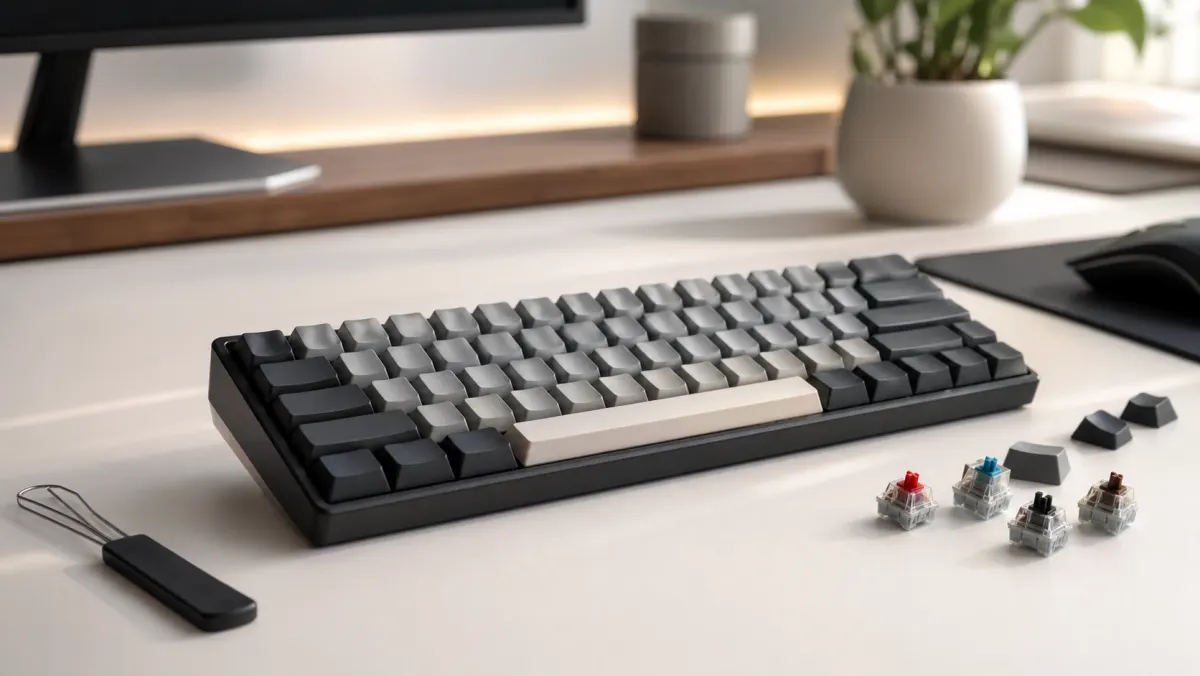
A mechanical keyboard can last for years and make daily work more comfortable, but it is also easy to buy the wrong one if you only look at price or design. This guide covers the main things to check before buying, whether you write for hours, play games, code, edit video, or simply want a better keyboard than a typical membrane model.
Start with your main use
Before comparing specs, decide what you need the keyboard for. A shared-office keyboard, a competitive gaming keyboard, a long-form writing keyboard, and a portable keyboard should not be chosen in the same way.
- Typing: prioritize comfort, stability, sensible key spacing, light tactile or smooth linear switches, and pleasant keycaps. If it does not need to be mechanical, also compare the best cheap keyboards for office work and daily typing.
- Gaming: look for low latency, consistent keys, a form factor that leaves room for the mouse, and software for macros or profiles if you need it. If you want specific models, check our selection of the best gaming keyboards.
- Programming: value symbol access, usable function keys, good ergonomics, and compatibility with your operating system.
- Office work: pay close attention to noise, connectivity, size, and comfort during long days.
- Mixed use: a 75%, TKL, or compact layout with moderate switches is usually the most balanced choice.
Switches: the choice you feel most
Switches are the mechanisms under each key. They define feel, sound, required force, and part of the perceived speed. If you want to understand how to choose a mechanical keyboard without getting lost, start with the three main switch families.
- Linear: smooth all the way down, with no tactile bump. Popular for gaming because they feel fast and fluid.
- Tactile: include a small bump during the press. They help you feel when the key actuates and are popular for typing.
- Clicky: add a clear audible click. They can be satisfying, but they are loud and rarely ideal for offices, calls, or shared spaces.
Actuation force matters too. A light switch can reduce fatigue but may cause accidental presses if you rest your fingers heavily. A heavier switch gives more resistance, but it can become tiring. If you are unsure, choose a light-to-medium linear or tactile switch.
Keyboard size and form factor
The form factor decides how many keys you get and how much space the keyboard takes. There is no single best size for everyone: the best size is the one that matches your desk, habits, and shortcuts.
- 100% or full-size: includes the numpad, arrows, and navigation cluster. Great for spreadsheets and numeric work, but large.
- TKL or 80%: removes the numpad while keeping arrows and function keys. A very comfortable choice for gaming and general desktop use.
- 75%: keeps many useful keys in a smaller body. One of the best balanced formats if you want to save space without relying too much on layers.
- 65%: keeps arrows and a few navigation keys, but removes the function row. Good for small desks.
- 60%: very compact and portable, but requires key combinations for arrows, function keys, and navigation. Best if you already like that style.
Layout: ISO, ANSI, and language needs
Layout matters more than many buyers expect. Check whether the keyboard is ISO, ANSI, Spanish ISO, UK ISO, US ANSI, or another variant. An ANSI keyboard can work with different system languages, but some key shapes and printed symbols may not match what you type.
If you write in Spanish, look for the Ñ key, ISO Enter, visible symbols, and a layout that does not force you to memorize too many combinations. If you code, check the position of slash, brackets, braces, semicolon, quotes, and accent keys.
Keycaps: material, profile, and legends
Keycaps affect feel, sound, and durability. The most common materials are ABS and PBT. ABS usually feels smoother and may become shiny over time; PBT resists wear better and often has a more textured feel.
- PBT: recommended if you want durability and less shine over time.
- Doubleshot: legends are made from two pieces of plastic and are hard to wear away.
- Dye-sub: durable printing, often found on PBT keycaps.
- Profile: Cherry, OEM, XDA, and other profiles change height and shape. Cherry and OEM are familiar choices if you are unsure.
Noise and sound profile
A mechanical keyboard does not have to be extremely loud, but you should think about sound before buying. Clicky switches are the loudest. Tactile and linear switches can be moderate when the keyboard has good internal foam, decent stabilizers, and solid keycaps.
If you work near other people, look for silent switches or smooth linears, avoid clicky switches, and check comments about the spacebar and larger keys. A cheap keyboard with rattly stabilizers can sound worse than a simple but well-built model.
Build quality, stabilizers, and mounting
Build quality affects rigidity, sound, and stability. A heavy case does not automatically make a keyboard better, but it often adds a feeling of solidity. What matters is that the board does not flex annoyingly, large keys do not rattle, and the case does not sound hollow.
- Stabilizers: affect the spacebar, Enter, Shift, and Backspace keys. Poor stabilizers make these keys sound metallic or unstable.
- Plate: steel, aluminum, polycarbonate, and other materials change stiffness and sound.
- Internal foam: reduces resonance and makes the keyboard sound fuller.
- Hot-swap: lets you change switches without soldering. Very useful if you want to experiment or repair one key easily.
Wired, wireless, and latency
For general use, Bluetooth is convenient if you switch between a laptop, tablet, and desktop. For gaming, wired or 2.4 GHz wireless usually offers better latency than Bluetooth. If you choose a wireless model, check battery life, charging method, wired mode, and how many devices it can pair with. The key is making sure the wireless mode you will use has the stability and latency you need.
Software, macros, and compatibility
Software can help you remap keys, create macros, control lighting, or change layers. Still, it should not be required for basic functions. If you use macOS, Linux, or multiple systems, check modifier keys, Mac/Windows modes, and whether settings are stored onboard.
For advanced users, QMK or VIA compatibility can be a major advantage because it allows deep layer and shortcut customization without relying on heavy manufacturer software.
Ergonomics and daily comfort
Ergonomics is not only about the keyboard. Desk height, chair position, mouse placement, and wrist rest use all matter. A very tall keyboard can force wrist extension; a compact keyboard can bring the mouse closer and relax your shoulder.
If you type for many hours, look for moderate typing angle, stable feet, comfortable keycaps, and a size that does not force your shoulders inward. A wrist rest can help, but it will not fix a poor posture.
Budget: what to expect for the price
There are good budget mechanical keyboards, but it helps to know where the quality jumps usually appear. Entry-level boards can offer good switches and a comfortable size, though they may have simpler keycaps, weaker stabilizers, or limited software. Mid-range boards often add better keycaps, hot-swap, improved sound, and cleaner construction.
Do not pay more just for RGB lighting, dramatic names, or vague claims. Pay for what you will notice: suitable switches, the right layout, stability, durable keycaps, reliable connection, and clear warranty terms. For very tight budgets, separate basic, quiet, and affordable gaming options clearly.
Quick buying checklist
- Define your main use: typing, gaming, programming, office work, or mixed use.
- Choose the size: 100%, TKL, 75%, 65%, or 60%.
- Confirm the layout: ISO Spanish if you write heavily in Spanish.
- Pick the switch type: linear, tactile, or clicky, with suitable force.
- Check real-world noise, stabilizers, and build quality.
- Review keycaps: material, profile, and legends.
- Choose connection: wired, Bluetooth, or 2.4 GHz depending on use.
- Consider hot-swap if you want to change switches or extend lifespan.
- Check compatibility with Windows, macOS, Linux, or console if needed.
- Read warranty terms and return policy.
See the Best Gaming Keyboards
If you already know what to look for, jump to our recommended models and compare specific options. If you want a lower-cost option for office work, typing, or a first setup, you can also review the cheap keyboard selection.
Frequently Asked Questions
What is the best mechanical keyboard for beginners?
A TKL or 75% keyboard with the correct language layout, moderate linear or tactile switches, and hot-swap support is usually a good starting point.
Are mechanical keyboards better for gaming?
They can be, thanks to consistency, feel, and low latency, but not every model is equal. For gaming, size, connection, key stability, and comfortable switches matter most.
Which mechanical keyboard is quietest?
Models with silent switches, good internal foam, and well-tuned stabilizers are usually the quietest. Avoid clicky switches if noise is a priority.
Is hot-swap worth it?
Yes, especially if you are not sure which switch you prefer or you want to repair and upgrade the keyboard over time without soldering.
Conclusion
The best answer to how to choose a mechanical keyboard starts with your real use. Choose size and layout first, then switches and noise, and finally check build quality, keycaps, connection, and compatibility. That order helps you avoid paying for extras you do not need and makes it easier to buy a keyboard you will enjoy for years.